Introduction
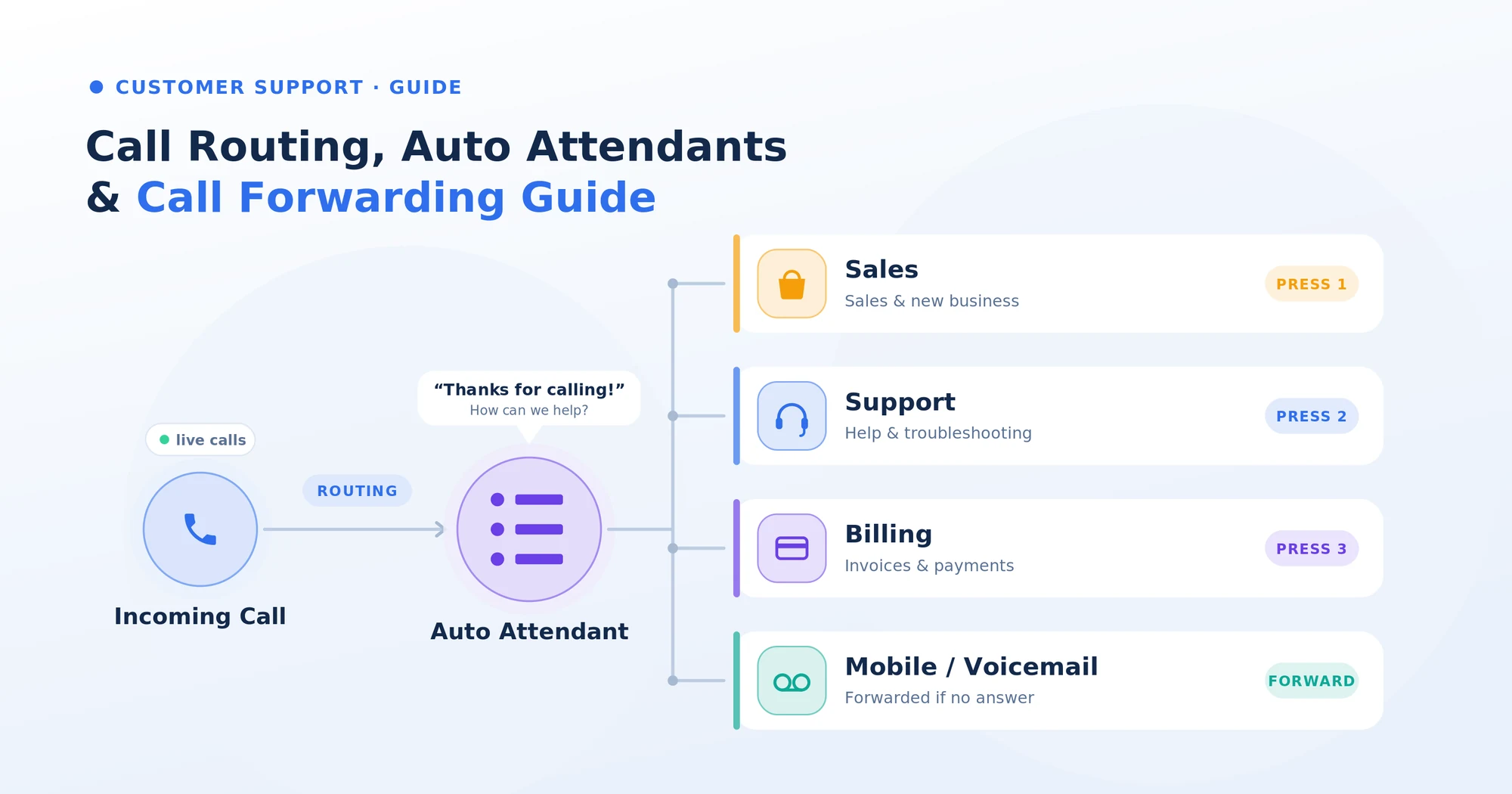
Every inbound call to your business takes a journey. Where it rings, who picks up, what menu it hears, where it bounces if no one answers — that journey is call flow. Three building blocks shape it: call routing decides where the call goes, auto attendants greet and direct the caller, and call forwarding sends a call onward when the original line can’t take it. Used well, the three together mean no call ever ends in voicemail. Used badly, they create the 8-option phone tree everyone hates. Here’s how each one works, how they connect, and how modern AI is quietly making all three smarter.
Key Takeaways
- Call routing, auto attendants, and call forwarding are three different things that work together to shape your business call flow.
- Call routing is the logic — rules that decide where a call goes based on caller, time, language, or skill.
- This is the front-door menu — the recorded greeting that gives the caller options.
- Call forwarding is a fallback — sending a call to another number, device, or voicemail when the original line doesn’t answer.
- AI is replacing the old “press 1 for sales” menus with intent-aware routing that listens to the first sentence and routes intelligently — no buttons required.
What each one actually is
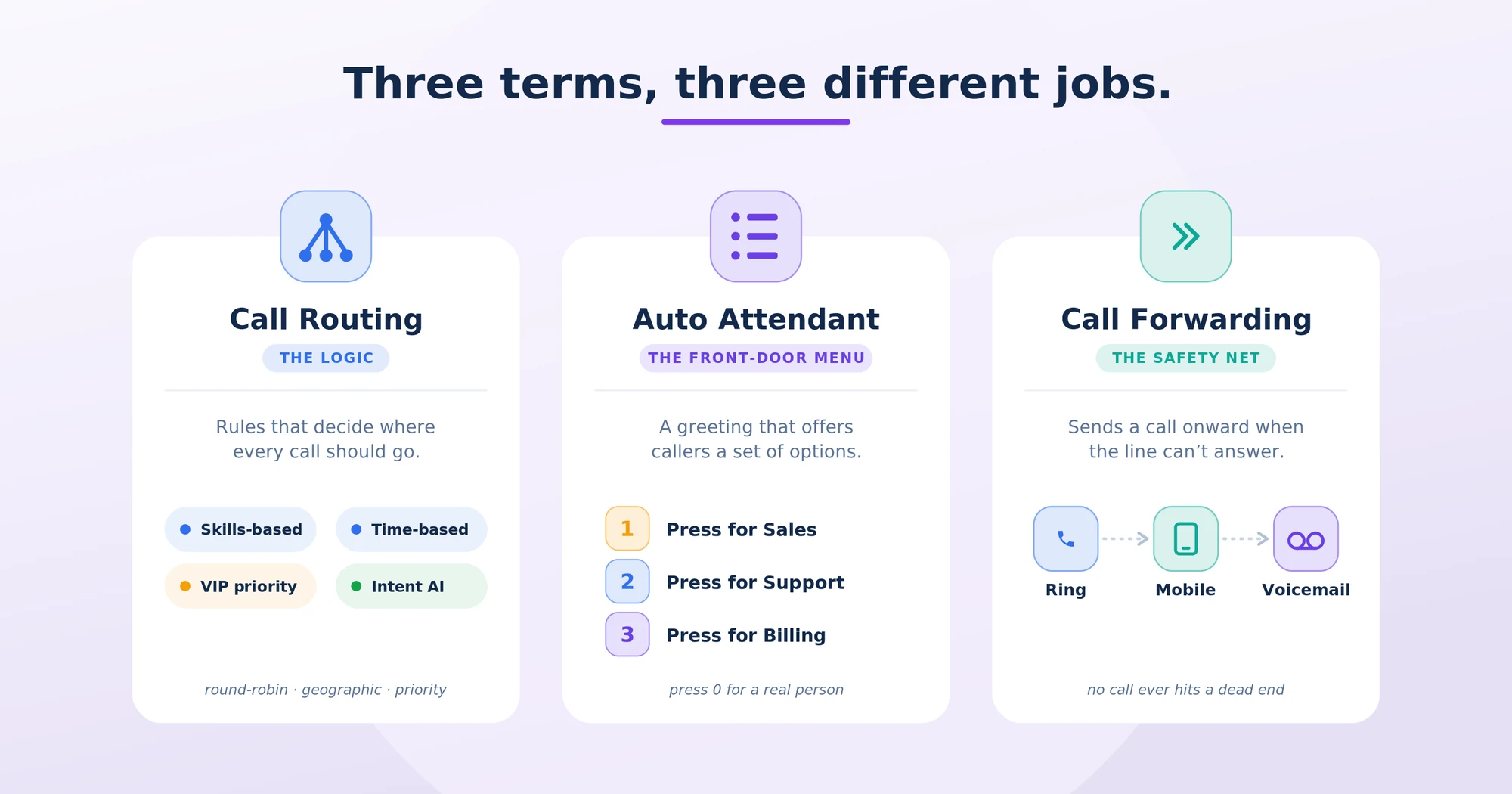
These three terms get used interchangeably online. They shouldn’t be. Each has a specific job.
Call routing
Routing is the underlying logic that decides what happens to a call. The rules can be simple (“send all calls to Lisa”) or sophisticated (“route Spanish-speaking callers between 9 AM and 5 PM Central to the bilingual support team, except on holidays, with overflow to voicemail after 30 seconds”). It is the brain of call flow.
Common routing types:
- Round-robin — distributes calls evenly across a team.
- Skills-based — sends the caller to the agent with matching skills (language, product, tier).
- Time-based — routes by business hours, time zone, or holiday calendar.
- Geographic — routes by the caller’s number or location.
- Priority — VIP callers, existing customers, or high-value leads skip the queue.
- Intent-based (AI) — listens to the caller’s first sentence and routes to the right destination automatically.
Auto attendant
A phone menu is the recorded greeting that meets the caller and offers options. “Thanks for calling Acepeak — press 1 for sales, press 2 for support, press 3 for billing.” It’s the equivalent of a receptionist at a front desk, but built from menu choices and routing rules rather than a human conversation.
A well-designed menu is short, gives no more than three or four options, and includes a path to a real human within one menu level. A badly designed one has eight options, three nested menus, and a dead-end on option 7.
These menus are sometimes called virtual receptionists or digital receptionists — but a true AI receptionist is a different animal entirely. The menu plays options. An AI receptionist holds a conversation.
Call forwarding
Call forwarding is the simplest of the three. It tells the system: if a call rings here and isn’t answered, send it somewhere else. That “somewhere else” can be another extension or team, a mobile phone, an external number, voicemail, or an after-hours service.
Variants include:
- Always forward — every call goes straight to the forwarding destination.
- Forward on busy — only when the line is in use.
- Forward on no answer — after a set number of rings.
- Conditional forwarding — based on caller ID, time, or business hours.
Call forwarding is the safety net that keeps calls from disappearing into voicemail.
How the three work together
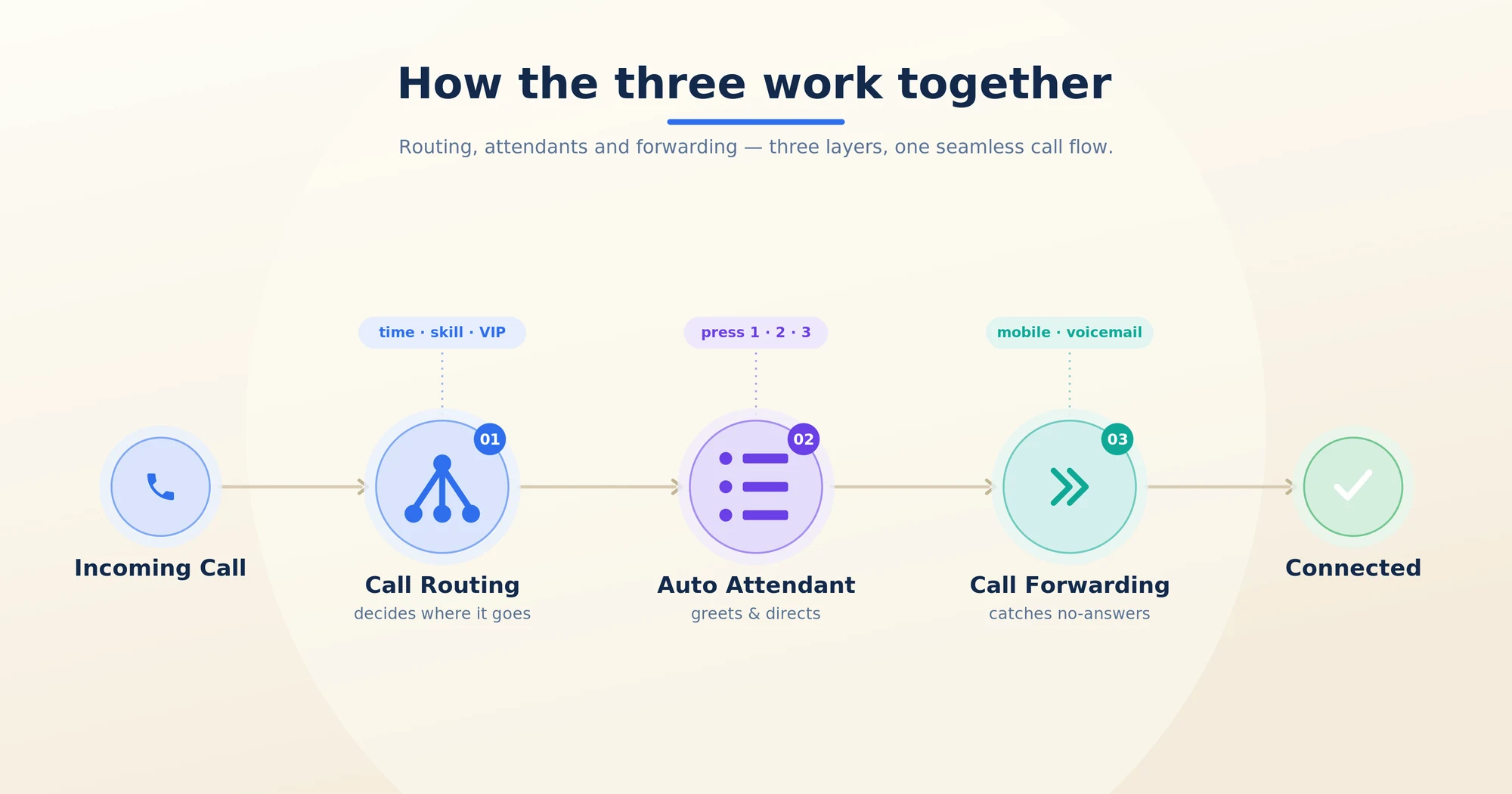
In a healthy call flow, the three pieces stack like this:
- A call comes in.
- Routing rules decide where it should go first — based on time, language, caller, or intent.
- If routing lands on a menu, the menu plays a greeting and offers options.
- The caller’s selection — or the AI’s understanding of their intent — triggers more routing logic.
- If the destination doesn’t pick up, call forwarding kicks in to send the call onward — to a colleague, a mobile, or voicemail.
In other words: routing decides where, attendants greet and direct, forwarding catches what falls through. Three layers, one experience.
See call flow that doesn’t need an 8-option menu.
Acepeak’s AI-powered routing listens to the first sentence and sends every call to the right team — instantly.
Modern call routing: where AI changed the rules
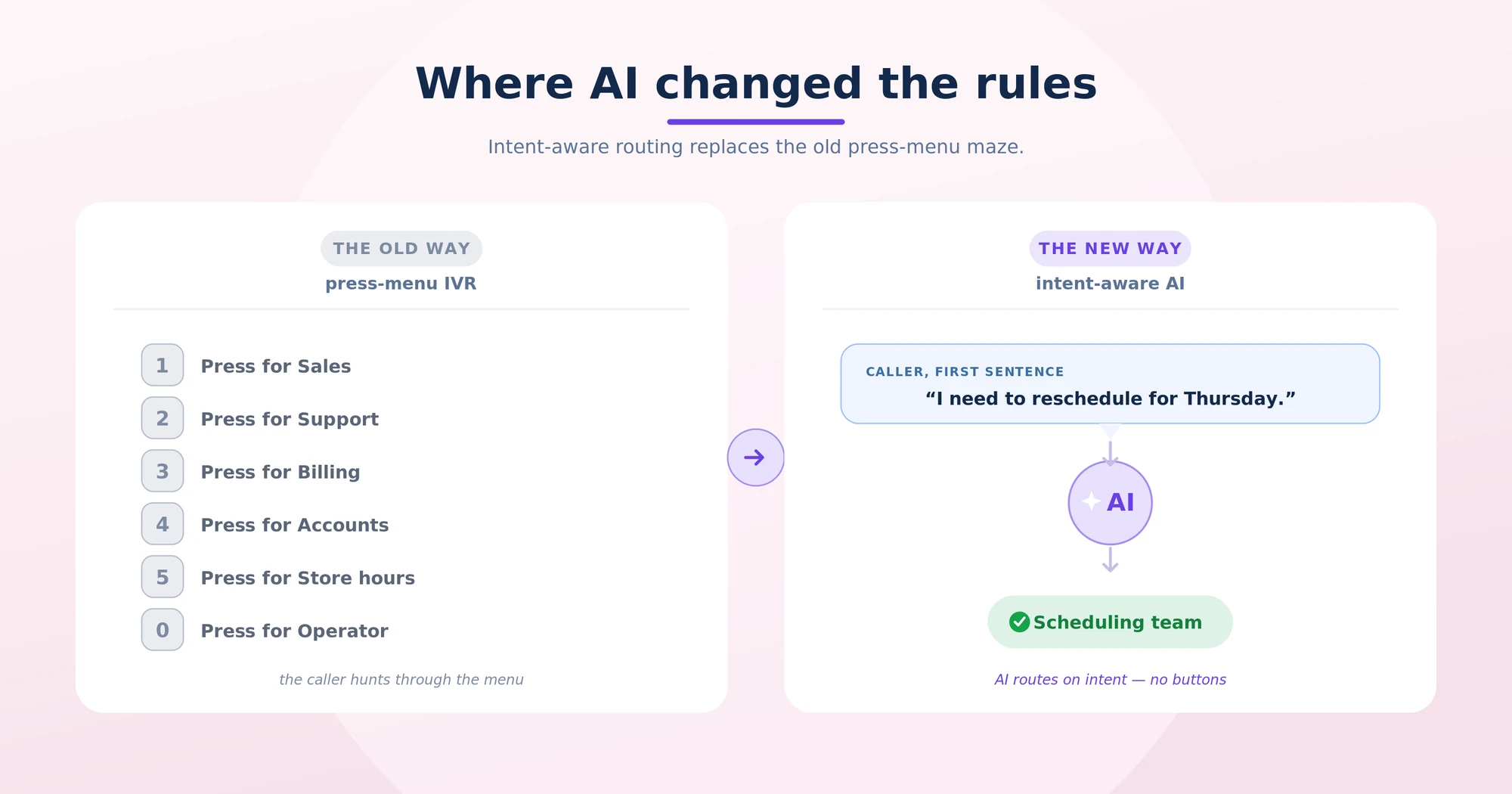
The traditional model — IVR menus and ring groups — was designed for an era when listening to a customer’s first sentence required a human. AI removed that constraint.
Today’s best UCaaS platforms ship intent-aware routing:
- The caller says, “I need to reschedule my appointment for Thursday.”
- The AI parses the sentence in real time.
- The call is routed directly to the scheduling team — no menu, no button, no wait.
The downstream effect is the disappearance of long menus. The two-option “say sales or support” is replaced by the open-ended “how can we help you today?” — and the AI does the routing work the caller used to have to do.
Intent-based routing also unlocks behaviors that were impossible with menus:
- Detect sentiment and route angry callers straight to a senior agent.
- Detect language on the first word and route to a bilingual team.
- Detect urgency — emergency calls in healthcare, fraud calls in finance — and skip the queue entirely.
This is why competitive UCaaS evaluations increasingly come down to “how smart is your routing layer” — because that’s the layer the caller actually experiences.
How to design call flow that doesn’t frustrate callers
A short framework that filters out 80% of bad implementations:
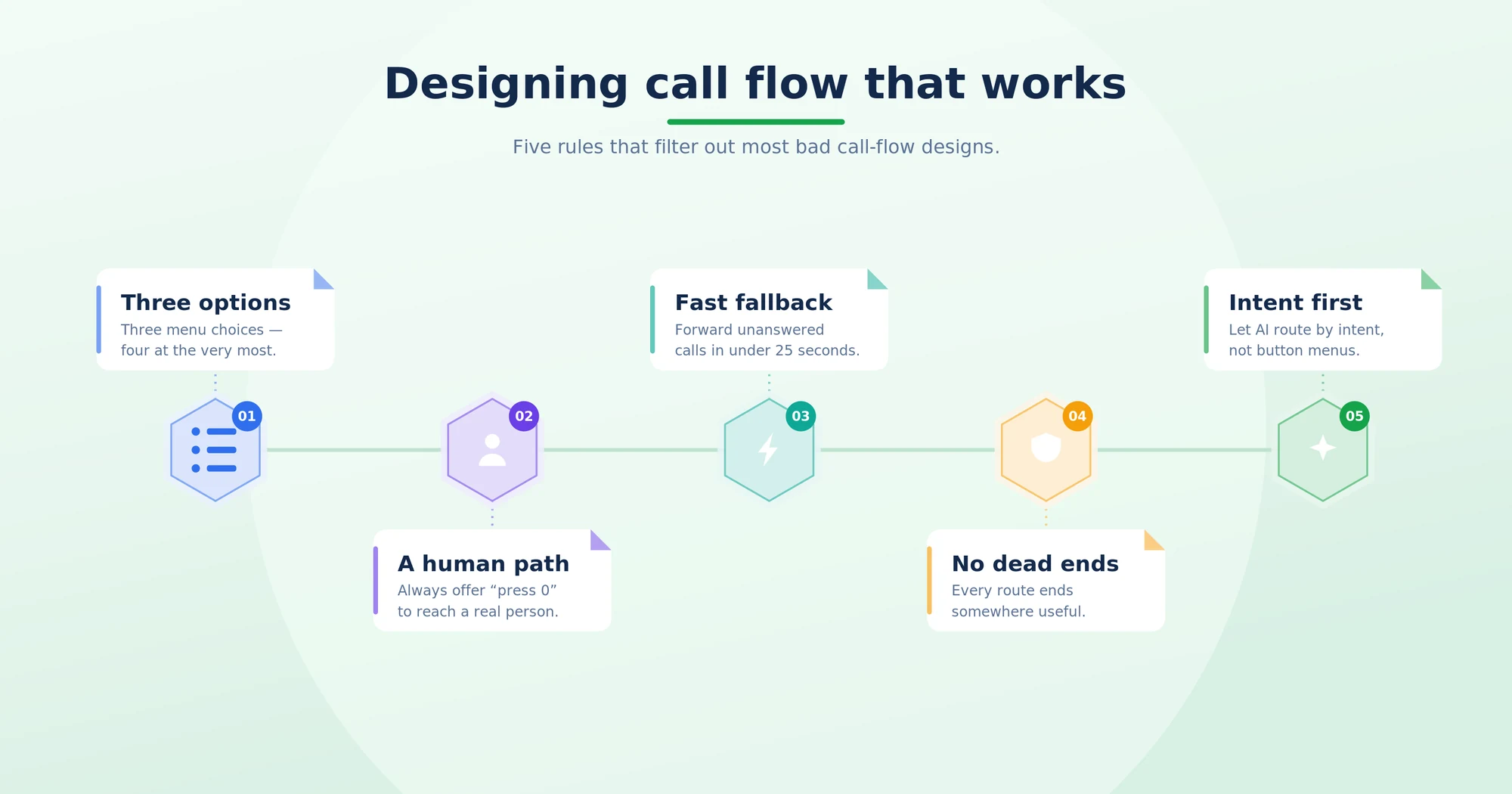
- No more than three options at the first menu. Four is the absolute maximum. Five becomes a memory test.
- Offer a path to a human in the first menu. “Press 0 to speak to someone” is non-negotiable.
- Set a forward-on-no-answer threshold under 25 seconds. Anything longer feels like abandonment.
- Always have a fallback destination. Every routing path ends somewhere — voicemail with transcription, an AI receptionist, or a backup queue. Never a dead end.
- Pair every routing rule with an out-of-hours rule. Your call flow at 2 AM should be different from your call flow at 2 PM.
- Use intent-based routing where the platform supports it. It’s strictly better than menu trees, in every measurable dimension.
- Audit the flow quarterly. Listen to ten real calls. The flow you launched with isn’t the one you need a year later.
When to use which
- Use routing rules when behavior should vary by caller, time, language, or skill. Routing is the default.
- Use a phone menu when callers genuinely need to choose between distinct destinations — sales vs. support vs. billing — and AI routing isn’t available.
- Use call forwarding as a safety net — for after-hours coverage, mobile pickup, and overflow.
- Use an AI receptionist when you want the front door to converse rather than present a menu — especially for appointment booking, lead qualification, and 24/7 coverage.
The right answer for most modern businesses is all four, layered together — with AI doing the heavy lifting on routing.
One platform. Smart routing. Zero menus when you don’t need them.
Acepeak ships routing, attendants, forwarding, and an AI receptionist on the same cloud phone.
Conclusion
Call routing, auto attendants, and call forwarding aren’t competing features — they’re three layers of the same system. Together, they decide whether every inbound call lands somewhere useful or drops into the void.
The shift happening right now is that AI is taking over the routing layer. Old-school menu trees are being replaced by intent-aware AI that understands what the caller wants without making them press anything. Businesses that update their call flow to reflect that shift see fewer abandoned calls, faster resolution, and happier callers. The ones still tuning their 8-option menu are solving last decade’s problem.
Questions, answered.
Call routing decides where a call should go in the first place, based on rules. Call forwarding sends a call onward when the original destination doesn’t pick up. Routing is proactive; forwarding is a fallback.
They’re closely related but not identical. An IVR (Interactive Voice Response) can collect caller input — account numbers, dates — and use it for routing. An auto attendant is simpler: it plays a greeting and offers a menu. Most modern UCaaS platforms blur the line.
For most businesses, yes. An AI receptionist holds a real conversation and takes action — books, qualifies, transfers — where an auto attendant just plays a menu. AI receptionists deflect more calls and frustrate fewer callers.
Yes — most business phone systems support forwarding to any phone number, including mobile. Some offer “simultaneous ring” so your desk phone and mobile ring together, and whichever you answer first wins.
Yes. On a global UCaaS platform, routing rules can span locations, time zones, and languages. A single inbound number can intelligently route to the right office anywhere in the world.
Three signals: the average caller reaches a human or a resolution in under 60 seconds, your abandon rate sits below 5%, and you never receive complaints about menus. If any of those are off, the flow needs work.
The best auto attendant systems combine simple menu building with real IVR call-routing logic — time-of-day rules, department queues, and call forwarding that follows staff rather than a fixed desk phone. Acepeak's auto attendant is configured from a dashboard with no PBX hardware required.